

- 01 Introduction
- 02 Why Financial Modelling Matters in Modern Finance
- 03Excel Fundamentals Every Modeller Must Master
- 04 Structuring a Financial Model for Clarity and Auditability
- 05 Five Key Steps: How to Build a Financial Model from Scratch
- 06Advanced Techniques: Taking Your Models Further
- 07 Real-World Modelling Examples
- 08Common Modelling Challenges and Lessons Learned
- 09Building Your Modelling Skillset: A Practical Roadmap
- 10Conclusion and Actionable Insights
Building Financial Models in Excel:
From Fundamentals to Advanced Applications
Table of Contents
01 Introduction
The topic of financial models in Excel holds a special place in the skill set of finance and accounting professionals. Unlike many technical skills that are relevant within a specific subset of practice, the skill of constructing, interpreting and critically analysing a financial model is universally applicable across all areas of practice – from corporate finance and investment banking to audit, management consulting, treasury and in-house CFO roles. It is the art of the analysis that translates numbers into stories, and the science that translates stories into the rigour of numbers and the real world.
- Financial models is one of the most accessible, high-return skills a young finance professional can acquire – the software is ubiquitous in the corporate world, the frameworks are accessible to anyone with basic numeracy, and the benefits to a career of having a strong command of financial modelling are immediate and long-lasting.
- The individuals who develop the best reputations in transaction advisory, financial planning, and corporate strategy are almost always those who can structure complex business problems into quantitative models – and that is exactly what financial modelling is.
Beginning financial modelling in Excel is often taught in a formal educational context as formula exercises or accounting identity problems. These exercises are a good place to start, but they are not a good predictor of the analytical skills required on day one in a real-deal team, a FP&A function, or a valuation engagement. Finance models are not simply scaled-up versions of the textbook examples – they are interactive workspaces that need to be flexible enough to answer questions that weren’t foreseen when the model was first constructed, robust enough to withstand version control and multi-person editing, and presentable enough for a senior peer to review in the 20 minutes before a critical meeting.
- This guide covers the entire spectrum of financial modelling in Excel – from the fundamentals of model design and formula best practice, to advanced modelling techniques such as dynamic scenario models, sensitivity analysis tables and three-statement models.
- It is aimed at junior and mid-career professionals who want to develop “real” finance modelling skills in Excel – either to improve their current performance, or to prepare for roles where modelling skills are essential.
|
A financial model is not a spreadsheet full of numbers. It is a case about how a business operates, how it will perform given certain assumptions, and what its performance is worth. The quality of the model constrains the quality of the argument. |
02 Why Financial Modelling Matters in Modern Finance
Examples of corporate finance modelling from all corners of the professional world – from the leveraged buy out (LBO) model that defines how much a private equity fund will pay for a company, to the integrated three-statement model that a CFO uses to determine the company’s annual budget, to the impairment test that an auditor reviews at the end of the year – all have one thing in common: the quality of the decision that they inform is limited by the quality of the model that generates the figures. Recognising the importance of modelling is the first step towards elevating the discipline to its rightful place.
- Models are the primary instrument used to make capital allocation decisions in all areas of the economy. Capital allocation, valuations, business plans, capital raising and financial reports are all dependent on the quality and transparency of the models that generate the numbers upon which decisions are based.
- The fastest track to success in corporate finance, advisory, and in-house finance positions is the ability to produce models that are trusted – trusted because they are well structured, rigorous, and well communicated.
The most obvious value proposition for a junior professional in financial forecasting with Excel is the opportunity to participate in real-world analytical projects early in one’s career. Merger and acquisition teams, finance planning and analysis teams, and valuations teams are all hungry for analysts who can take instructions, build a model, and generate outputs to inform a decision – and the firms that can develop this skill most rapidly are the ones that attract the best people and provide the most advanced advice.
- In the competitive recruitment process for corporate finance, investment banking, and private equity jobs, modelling tests are some of the most widely applied assessment tools – and the ability to perform well under pressure shows a combination of technical skill and the ability to work effectively in a time-limited setting.
- Beyond the immediate career impact, the process of building dynamic financial models is an important training ground for a very valuable habit of mind: the discipline of making assumptions explicit, testing them against data, and assessing the sensitivity of conclusions to changes in assumptions.
03 Excel Fundamentals Every Modeller Must Master
The first step in Excel modelling for finance beginners is for users to understand which Excel capabilities are most fundamental to professional modelling practice, rather than the vast array of features most users only dip into. Even the most complex financial models are based on a relatively narrow range of functions and techniques, applied with great rigour and consistency.
- Core functions include: IF and nested IF (for conditional statements), SUMIF/SUMIFS and COUNTIF/COUNTIFS (for aggregating data by criteria), INDEX/MATCH (for flexible lookup and reference, a much superior alternative to VLOOKUP), OFFSET and INDIRECT (for dynamic ranges) and NPV/IRR/XIRR (for discounted cash flow and return calculations).
- Keyboard shortcuts are an expected skill in financial modelling – not optional. Ctrl+arrow keys for navigation, F4 for toggling between absolute/relative references, Ctrl+Shift+End for selecting a range, and Alt+E+S+V for pasting special values as constants are some shortcuts that save time and increase accuracy in financial modelling.
The skills needed to work with Excel in finance go beyond formulas to include modelling and presentation. An analytically accurate but poorly presented model is likely to be misinterpreted, misapplied, and ultimately discredited. All models use a standard colour scheme (usually blue for hardcoded inputs, black for formulas, and green for inter-tab links) that helps readers know where they are and what they are looking at.
- Named ranges and structured cell references enhance readability and prevent formula errors due to range references. All hard-coded assumptions in the model should be in a clearly identified input cell, not buried in a formula where they are hidden from view.
- Error-checking disciplines – avoiding circular references, using IFERROR to catch edge cases and having a separate check tab that reconciles major balance sheet items and highlights inconsistencies – are the hallmarks of a professionally constructed model compared to one that is inherently fragile to unexpected inputs.
Table 1: Essential Excel Functions for Financial Modelling — Use Cases and Examples
| Function / Technique | Primary Use in Financial Models | Typical Application |
|---|---|---|
| IF / Nested IF | Conditional logic — switching between scenarios, applying tax rates, handling negative earnings | =IF(EBITDA>0, EBITDA*TaxRate, 0) — tax only applies when earnings are positive |
| INDEX / MATCH | Flexible data lookup — pulling assumptions from tables, finding period-specific values | =INDEX(AssumptionTable, MATCH(Year, YearRow, 0), MATCH(Metric, MetricCol, 0)) |
| SUMIF / SUMIFS | Aggregating data by multiple criteria — segment revenue, cost by category, period totals | =SUMIFS(RevenueData, SegmentCol, “Software”, PeriodCol, “FY2024”) |
| OFFSET | Creating dynamic ranges that expand as the model is extended in time | Used in NPV formulas that reference a variable number of future cash flow periods |
| NPV / XIRR | Discounted cash flow valuation and IRR calculation — LBO returns, DCF valuation, project appraisal | =XIRR(CashFlows, Dates) — more accurate than IRR when periods are irregular |
| Data Tables (What-If Analysis) | Two-variable sensitivity analysis — varying WACC and terminal growth to show valuation range | Two-dimensional table varying discount rate and exit multiple across 25 combinations |
| CHOOSE with scenario toggle | Scenario management — switching model inputs between Base, Upside, and Downside | =CHOOSE(ScenarioToggle, BaseRevGrowth, UpsideRevGrowth, DownsideRevGrowth) |
04 Structuring a Financial Model for Clarity and Auditability
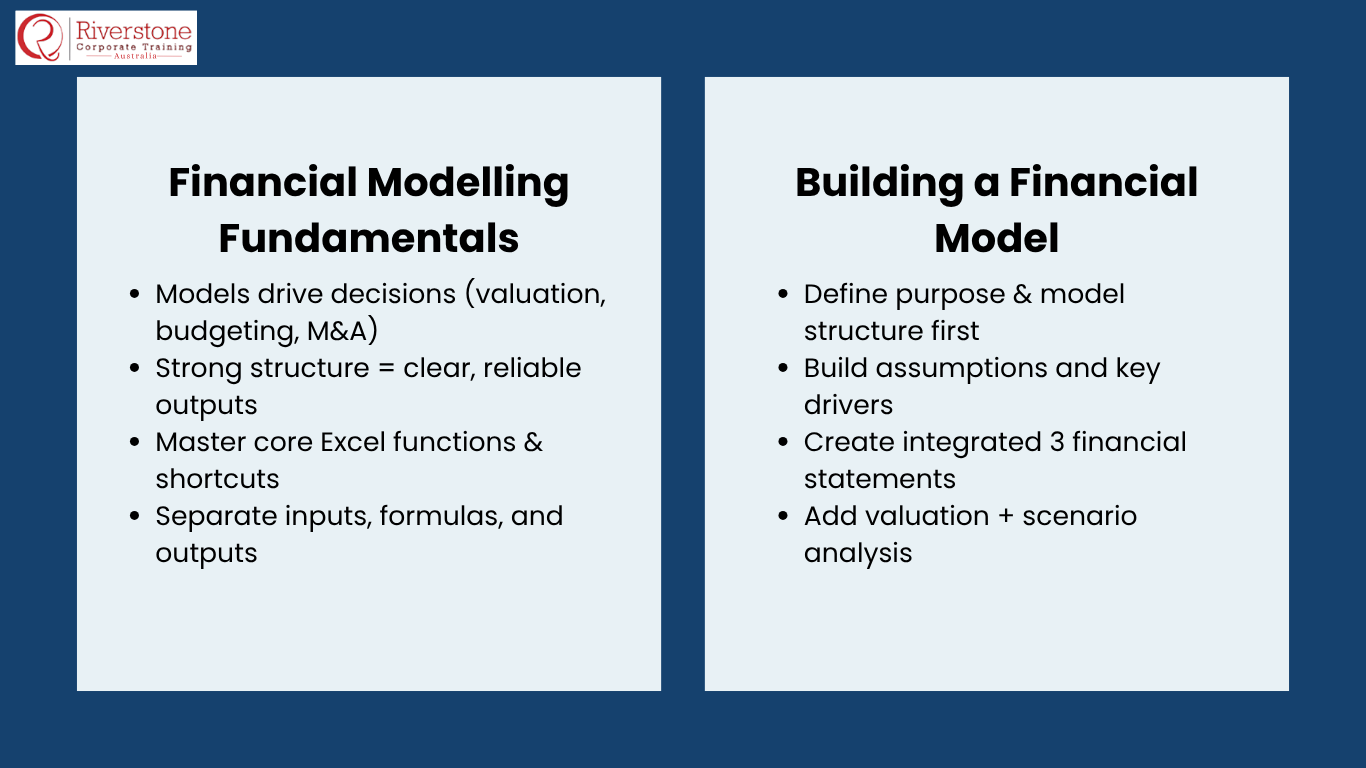
The key to building financial models step by step is structure. How a financial model is put together – how it is laid out, how data flows through it, and how it deals with the inputs, formulas, and outputs – is what makes it a useful model or a confusing and misleading mess. The fanciest formula in the world will not enable a poorly structured model to function, and a well-structured model can be extended and modified by someone else.
- The standard structure for a three-statement integrated financial model is a tab structure: a single Inputs/Assumptions tab (where all hardcoded drivers reside), separate Income Statement, Balance Sheet and Cash Flow Statement tabs (where formulas reference the assumptions, not hardcoded values), and a Summary / Outputs tab (where the key metrics are displayed for the reader).
- The most important structural rule is the Inputs vs. Formulas rule: all hardcoded numbers should be in one place, and all formulas should be in another. If the assumptions are hard-coded into the formulas across multiple tabs, the model cannot be updated, reviewed, or trusted.
The challenge of building dynamic financial models in the workplace is that we need to build models that can answer questions that we don’t anticipate when the model is first built. A model that can only output the base case results, and which needs to be overwritten to run different scenarios, is not dynamic – it is a static calculator. Dynamic models have toggles, data table structures and named ranges that enable any user to “test-drive” the model without modifying the underlying structure.
- Model version control – using filing conventions for model versions, keeping a change log, and not overwriting a model that has been sent to others – is a professional practice that avoids the data integrity problems that occur when multiple versions of a model are in circulation.
- The time spent on model structure up front – before any substantive calculations are built – is always the best investment in model building. Models that are restructured after the analytical content is built take twice as long to correct and contain twice as many mistakes as models that were structured properly in the first place.
Table 2: Model Architecture — Tab Structure Best Practice
| Tab Name | Content | Formatting Convention | Key Discipline |
|---|---|---|---|
| Cover / Navigation | Title, version, date, author, model purpose, and navigation links to key outputs | Dark header background; white text; version number prominent | Update the version and date every time the model is materially changed |
| Assumptions / Inputs | All hardcoded drivers — revenue growth, margins, capex rates, working capital assumptions, tax rate, discount rate | All inputs in blue font; clearly labelled; grouped by category with headers | No formulas here — only values. Every formula in the model should reference this tab. |
| Revenue Build | Revenue model — unit economics, pricing, volume, segment breakdown, contracted vs pipeline | Black formulas referencing Assumptions tab; clear period headers (FY2024, FY2025…) | Revenue should be built bottom-up, not assumed as a top-line growth rate without a basis |
| Income Statement (P&L) | Full income statement from revenue through to net profit after tax | Black formulas; subtotals clearly labelled (Gross Profit, EBITDA, EBIT, PBT, NPAT) | Ensure the EBITDA → EBIT → PBT → NPAT chain is explicit and traceable |
| Balance Sheet | Full balance sheet with asset, liability, and equity reconciliation | Green for links to other financial statements; check cell confirming BS balances | Always include a balance check — if Assets ≠ Liabilities + Equity, find the error before proceeding |
| Cash Flow Statement | Operating, investing, and financing cash flows; ending cash reconciliation | Green for links to P&L and Balance Sheet; clearly separated by activity type | Free cash flow (FCF) to equity and FCF to the firm should be explicitly derived |
| Valuation / Returns | DCF valuation, exit multiple analysis, IRR/MOIC for LBO models | Blue for assumptions (WACC, terminal growth, exit multiple); black for calculations | Ensure valuation outputs are tied to the financial model cash flows, not independent assumptions |
| Scenarios / Sensitivity | Data tables varying key assumptions; scenario comparison outputs | Clearly labelled; scenario toggle cell prominent; RAG formatting for outputs | Sensitivity tables should test the variables most material to the valuation or returns conclusion |
05 Five Key Steps: How to Build a Financial Model from Scratch
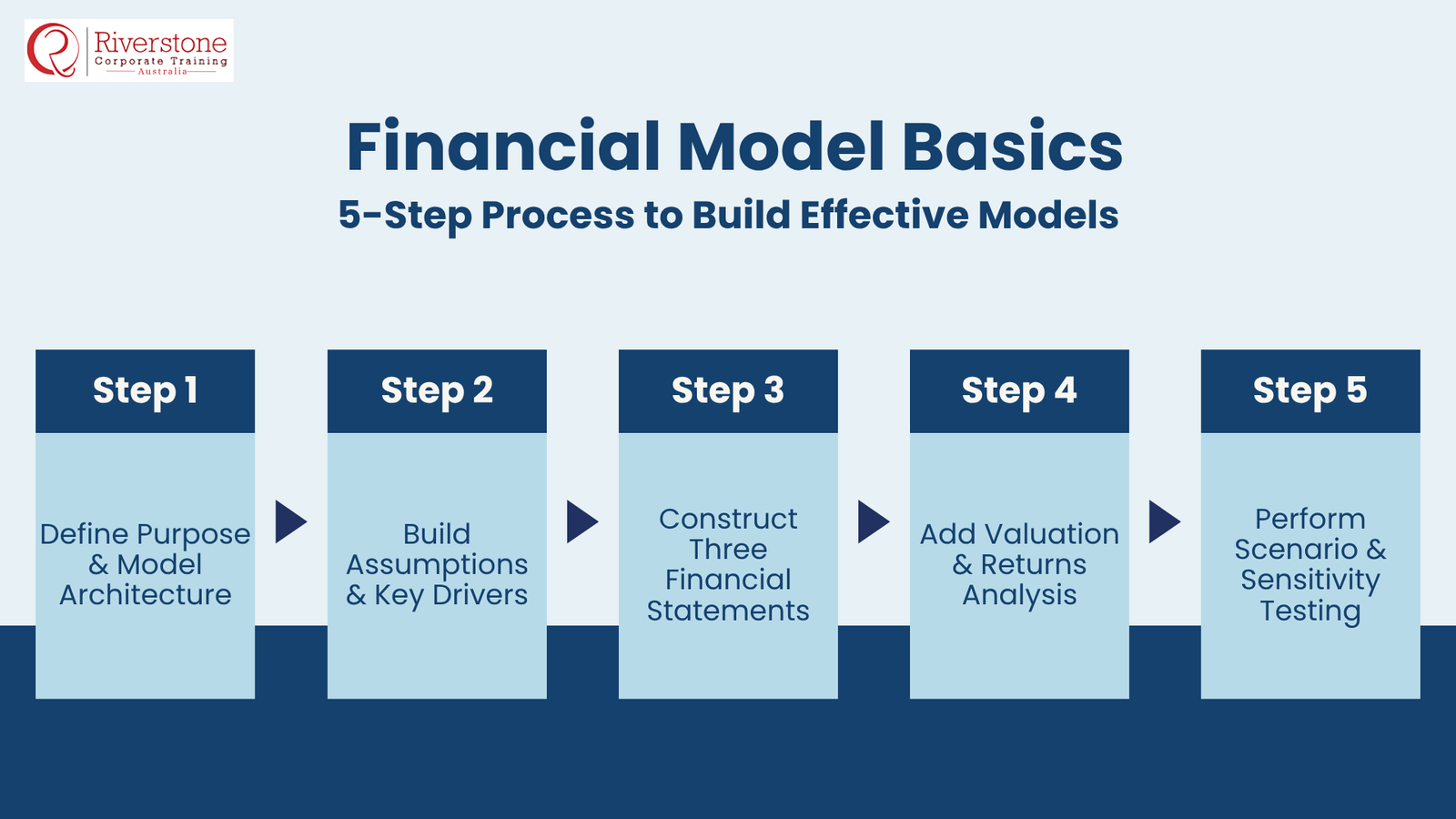
The financial modelling process is a five-step sequence from defining the purpose to the analytical output. Knowing this process – and the deliverable at each step – is the operational know-how that distinguishes those who build effective models from those who start with a blank spreadsheet and work backwards from the output.
Step 1 — Define the Purpose and Model Architecture
The first step in the modelling process is for the modeller to answer these four questions: What is the purpose of this model? Who is it for? What does it need to do? And how sophisticated does it need to be to deliver these outputs? These questions define the model’s boundaries, architecture, and the level of detail required.
- A model to support a presentation to the transaction committee is different from one to support an internal budget review: the former needs to provide valuations and returns; the latter, variance analysis and cost breakdowns by department.
- Building a model that is more complex than necessary to support its intended use is as bad as building one that is too simple – it is more difficult to maintain, it is more likely to contain formula errors, and the outputs will be less clear and understandable to the users.
Step 2 — Build the Assumptions and Drivers Layer
The assumptions and drivers layer is the core of any financial forecasting in an Excel model – it is where the human judgment of the practitioner is translated into numbers. All future-looking numbers in the model should be linked to assumptions on this tab, and those assumptions should be documented with their sources and rationale.
- Revenue assumptions should be bottom-up, where possible: from identified market segments, contracted revenue, pricing and volume assumptions, rather than a top-down growth rate applied to the previous year’s revenue without a commercial rationale.
- Macro assumptions (inflation, interest rates, foreign exchange) should be taken from credible external sources (consensus economic forecasts, central bank policy) rather than from management’s “best case” estimates – especially in models that are to be audited or presented to investment committees.
Step 3 — Construct the Three Financial Statements
The three-statement model is the epitome of corporate finance modelling: it integrates the income statement, balance sheet, and cash flow statement so that changes to one statement affect the other two. Getting these statements right and ensuring they balance and reconcile with one another is the technical underpinning of more complex analysis.
- The income statement runs from revenue to gross profit to EBITDA to EBIT to profit before tax to net profit. Each line is calculated from the assumptions layer rather than being set as a margin target. Depreciation and amortisation come through from the balance sheet PP&E and intangible asset schedules to EBIT.
- The balance sheet and cash flow statement balance as an identity – if the balance sheet does not balance in each period, then there is something wrong with the model that needs to be identified and corrected before the model can be trusted. Having a check cell that confirms the balance sheet is balanced is a must.
Step 4 — Add Valuation and Returns Analysis
The valuation and returns layer translates the cash flows forecasted by the three-statement model into the analytics used to inform commercial decision-making. In an M&A or PE transaction, this would be a DCF valuation (discounted cash flow, using the WACC, to determine enterprise value) and an LBO returns analysis (internal rate of return and multiple on invested capital for the equity investor, based on a set of entry, leverage and exit assumptions).
- The WACC should be derived clearly from the cost of equity (CAPM-based) and the cost of debt (based on the model’s debt structure), with the target capital structure stated and benchmarked to the market, rather than simply assumed.
- The terminal value – which accounts for 60-80% of the DCF value – should be calculated using the Gordon Growth Model (terminal cash flow grown at a discount rate) and an exit multiple approach (terminal cash flow multiplied by an exit multiple), with the two approaches triangulating to a common answer.
Step 5 — Stress-Test with Scenario and Sensitivity Analysis
The estimate is not good enough for business. Scenario and sensitivity analysis transform the single-point base case into a tool that can quantify the range of likely outcomes – what a decision maker needs.
- Scenario analysis involves constructing alternative sets of assumptions (Base, Upside, Downside) that correspond to different commercial scenarios (typically, the expected outcome, the outcome if the key drivers of growth perform better than expected, and the outcome if they perform much worse than expected).
- Sensitivity analysis, best performed in Excel using the two-variable data table, illustrates how the key output variable (enterprise value, IRR, equity value) changes across a range of assumptions – usually varying the discount rate against the terminal growth rate, or varying revenue growth against EBITDA margin. This is one of the most valuable outputs from any Excel templates for financial analysis in valuations or transactions.
06 Advanced Techniques: Taking Your Models Further
Advanced financial modelling is built on the three-statement foundation to produce models that can answer more sophisticated questions. For corporate finance professionals, M&A advisors, and PE professionals, these advanced skills are what separate a good junior analyst from a great senior analyst – and the skills that hiring managers at the most prestigious firms are looking for.
- Handling circular references is one of the most technically significant advanced skills – that is, creating models in which the interest expense is a function of the debt balance, the debt balance is a function of the cash flow, and the cash flow is a function of the interest expense. This is a natural part of levered financial models, and the proper way to resolve this circularity (using an iterative calculation setting in the model, or a modelling trick involving a debt revolver) is a required skill in investment banking and PE.
- Building dynamic charts and dashboards – in which the charts automatically update as the scenario inputs change – is an important practical skill for analysts who prepare board packs, investor decks and management reports. Charts constructed with named ranges that update automatically, rather than chart ranges that must be manually expanded as the model changes, are a time-saver in the workplace.
Macro-enabled models and VBA programming are the cutting edge of financial modelling in Excel. While full-blown VBA programming is a specialist skill, a basic familiarity with VBA recording and simple macros (to automate repetitive formatting exercises, export outputs in a standard format, or refresh data connections) is a valuable skill for analysts who produce models in large quantities or who support processes that require regular, consistent outputs.
- Monte Carlo simulation in Excel – using the RAND() function or specialist add-ins to model probability distributions of outcomes – is now widely used in financial risk analysis, project finance, and scenario analysis for uncertain revenue streams. It takes the model from deterministic (one set of inputs, one set of outputs) to stochastic (multiple simulated outcomes represent the probability distribution of the outputs).
- Data connectivity using Power Query – linking live or regularly refreshed data from external systems (ERP, databases, market feeds) to the Excel model – is a significant productivity gain for analysts supporting recurring modelling exercises such as monthly budget variance reporting, portfolio management, or quarterly financial close processes.
07 Real-World Modelling Examples
Examples of corporate finance modelling based on real-world analytical challenges are the best way to improve modelling skills. The three examples below represent the types of modelling challenges most frequently faced in practice, with the names of the companies changed but the challenges real.
The SaaS LBO Model — Revenue Quality and ARR Dynamics
A deal team at a PE fund was considering acquiring a vertical SaaS company with $24 million in annual recurring revenue (ARR) and a subscription-based revenue model. The traditional LBO model structure had to be modified for the SaaS model – in particular, the revenue model had to be based on ARR rather than growth rates, with new logo acquisition, expansion with existing customers and churn modelled separately.
- The annual cohort model – which tracks each year’s new customer cohort from new logo acquisition through to churn, applied to the contracted ARR base – was much more accurate than the simple ARR growth rate assumption when tested against the past performance because it showed that the headline growth rate was highly dependent on the new logo momentum that was itself dependent on a sales team that was being doubled in size.
- The take-out: dynamic financial models for subscription economics-based businesses need a revenue structure that reflects the underlying dynamics of how the business acquires and retains revenue, not just a growth rate applied to a single line. Simplistic models of complex revenue systems always produce returns analyses that are more positive than the reality of the business.
The Manufacturing Group Budget Model — Three-Statement Integration
The CFO of a European industrial manufacturing group requested that her financial planning and analysis (FP&A) team develop an annual budget model that integrated four operating divisions, produced a group-level three-statement forecast, and enabled management to instantly compare scenarios of organic growth, capital investment and cost reduction. The division heads were all Excel users but not financial modellers.
- The answer involved a standardised divisional input template for the four divisions – a standardised sheet layout which each division head could fill in with their divisional assumptions, feeding into a consolidation sheet that did the inter-company elimination and produced the group P&L, balance sheet and cash flow statement. The cover page included a scenario-switch button to select among the three scenarios.
- The lesson: Excel templates for financial analysis that non-specialist users use must be designed with the user experience in mind – simple, clearly labelled input areas, robust input validation to ensure that the user doesn’t break formulas, and outputs that are immediately readable without the user having to understand how the model works.
The Acquisition Valuation Model — Handling the Integration Synergies
An M&A advisory team was developing a deal model for a strategic acquirer looking to acquire a competitor in the logistics technology industry. The problem was that the acquirer’s investment case was largely based on revenue synergies (cost benefits from integrated infrastructure and revenue from cross-selling the merged product portfolio), which are not certain and often do not materialise as planned.
- The modelling separated the business valuation on a standalone basis from the valuation with synergies, building the synergies as a separate, identifiable module with its own set of assumptions, probability-weighted, and tested in the sensitivity analysis. This enabled the IC to understand the company’s standalone value and the portion of the premium attributable to the synergy plan.
- The lesson: if the investment case is based on post-merger synergies, the model must be constructed to isolate the synergy contribution from the rest of the model so that it can be tested separately – not hidden in the base case as if it were something else. The art of financial forecasting in Excel. is to make the most risky assumptions the most obvious.
08 Common Modelling Challenges and Lessons Learned
The profession well understands the most common challenges in financial modelling, and knowing what to expect before they are encountered in practice is invaluable for the aspiring financial modeller. The process flow below outlines the entire model-building process and the most common pitfalls along the way.
Table 3: Financial Model Build Process — Phases, Activities and Common Failure Points
| Phase | Key Activities | Common Failure Point | Best Practice Response |
|---|---|---|---|
| 1. Scoping | Define model purpose; agree on outputs; determine level of granularity required | Building a more complex model than the purpose requires — adding analytical overhead without adding insight | Write a one-page model brief before opening Excel; confirm outputs with the model’s primary user |
| 2. Architecture | Design tab structure; establish naming conventions; set up colour-coding and formatting standards | Starting to build analytical content before the structure is finalised — making restructuring much more costly later | Build the full tab structure and the assumptions page before any financial calculations are entered |
| 3. Assumptions | Input all historical data; build forward-looking driver assumptions; document all sources | Embedding assumptions inside formulas rather than on a dedicated inputs tab — making the model impossible to update reliably | Every hardcoded input must live on the assumptions tab — no exceptions |
| 4. Financial Statements | Build income statement, balance sheet, and cash flow statement; verify integration links | Balance sheet that does not balance — caused by missing or incorrect cash flow linkages | Build a dedicated balance check cell; resolve any imbalance before proceeding to later stages |
| 5. Valuation / Returns | Build DCF, exit multiple analyses, and LBO returns as relevant to the model’s purpose | WACC or discount rate assumptions that are unsourced or inconsistent with the model’s purpose | Document all WACC components explicitly; cross-check against market benchmarks and comparable transactions |
| 6. Scenario Analysis | Build data tables; create scenario toggles; stress-test key assumptions | Sensitivity tables that test the wrong variables — choosing the most convenient rather than the most material drivers | Identify the two or three variables to which the output is most mathematically sensitive and test those |
| 7. Review and Audit | Conduct formula audit; check cross-tab links; verify outputs make commercial sense. | Accepting outputs that cannot be explained intuitively — ‘the model says so’ is not sufficient justification. | The sanity check: can you explain every line of the output in plain English? If not, find the assumption or formula causing the anomaly.y |
Beyond the process flow, there is a more fundamental challenge to all financial modelling work: the allure of spreadsheet accuracy. A model that is accurate to 15 decimal places can be inaccurate in its commercial logic, impractical in its assumptions or deceptive in its presentation. The key discipline that sets the most respected modellers apart is not their mastery of Excel formulas – it is their commitment to putting every output of their model to the commercial test before presenting it to a client or decision-maker.
- The most common lesson from the professionals is that the model is only as good as the assumptions. The use of a technically flawless formula to apply a commercially flawed assumption leads to an accurate but incorrect answer.
- The habit of writing down the justification for every significant assumption – not just writing down the number, but writing down where it came from and why it is reasonable – is the most important professional skill a modeller can learn, both for their own benefit and for the benefit of the reviewers of their work.
09 Building Your Modelling Skillset: A Practical Roadmap
The best way to learn financial modelling from scratch is to build your skillset in a progressive way – rather than trying to learn all the complexities of advanced financial modelling techniques before you have the discipline of the basics. The roadmap below is based on the learning architecture that consistently delivers the best practitioners, recognising that modelling is a craft and the best way to learn a craft is through practice.
Table 4: Financial Modelling Skill Development — Structured Progression
| Stage | Focus Areas | Key Practice Activities | Target Competency |
|---|---|---|---|
| Foundation (0–3 months) | Excel fundamentals: formula fluency, formatting discipline, keyboard shortcuts, basic P&L and balance sheet construction | Rebuild published financial statements in Excel from annual report data; practice INDEX/MATCH, IF, and SUMIFS on real datasets; memorise the 20 most important keyboard shortcuts | Build a basic three-statement model from scratch without assistance in under 4 hours |
| Development (3–9 months) | Three-statement integration, DCF valuation, scenario and sensitivity analysis, and model review discipline | Build a DCF model for a listed company using public financial data; stress-test assumptions using data tables; practice reviewing other people’s models for formula and structural errors | Identify and fix errors in a model you did not build; produce a complete valuation with scenario analysis |
| Proficiency (9–18 months) | LBO modelling, advanced scenario frameworks, debt scheduling, working capital modelling, sector-specific adaptations (SaaS, manufacturing, real estate) | Build a complete LBO model for a fictional PE deal; adapt the revenue model for subscription economics; build a working capital cycle for a seasonal business | Build a transaction-ready financial model independently; present and defend assumptions in a deal team setting |
| Advanced (18+ months) | VBA and Power Query automation, Monte Carlo simulation, consolidation models, and Power BI integration for reporting | Automate monthly reporting using VBA; build a consolidation model across 4 divisions; integrate Power Query for live data feeds from an ERP system. | Build enterprise-grade analytical tools; mentor junior modellers; manage model quality across a team or project. |
The optimal practice approach for developing financial modelling in Excel guide skills is to rebuild real models – starting with a published financial model (an investment bank’s equity research model, an independent expert report, or a published LBO case study) and independently developing every formula, every link, and every output until the rebuilt model is an identical copy of the original. This requires active engagement with all modelling decisions, rather than passive absorption of a completed model.
- The best free curriculum for learning financial modelling from scratch is the collection of published scheme booklets, independent expert reports and equity research models available from ASX company announcements and sell-side research sites – real models developed by real people for real purposes, available for any practitioner who wants to dissect and learn from them.
- Personal modelling practice goals of building one new financial model (even a small one) each month for the first year of serious modelling development are the most effective practice routine. The models should be for different purposes (DCF one month, LBO the next, budget model the next) to develop the range of Excel finance skills that the most valuable practitioners have.
10 Conclusion and Actionable Insights
The development of an Excel financial modelling guide is a career investment that pays dividends, as each model built adds to the practitioner’s commercial judgement, analytical rigour, and comfort with the quantitative complexity of the business environment. Learning financial modelling from scratch is not a daunting task if undertaken progressively – from the basics of Excel and the construction of the three statements to DCF valuation and scenario analysis, and finally to the advanced financial modelling techniques that represent the most mature practice.
The key takeout from this guide is that the ability to build dynamic financial models is not just a technical skill in Excel – it is a commercial judgement skill in building the right model for the right purpose, an analytical skill in making model assumptions explicit and defensible, and a communication skill in presenting model outputs in a way that meaningfully informs decision-making. Examples of corporate finance modelling reveal that the most useful models are not the most sophisticated – they are the most transparent, the most structurally accurate, and the most representative of the underlying commercial reality of the business they model.
- Learn the three-statement integrated model before the DCF and LBO models. The three-statement integrated model is the starting point for all more advanced modelling and analysis, and any errors in the underlying three-statement model will be compounded in subsequent analyses.
- Use a professional modelling standard from the beginning – colour coding, input/formula segregation, version control and balance checks are not “nice to have” for a junior modeller; they are the skills that make your models robust and your work product scalable.
- Forecast financials in Excel from the beginning. Modelling on fictitious data produces technically proficient modellers without commercial acumen; modelling on published financial data produces practitioners who can assess the reasonableness of their assumptions.
- Include a scenario and sensitivity analysis layer in every model you build, no matter what the model is for. Being able to test your conclusions against alternative scenarios is the most valuable risk mitigation skill for any analyst.
- Learn from financial analysis Excel templates from a trusted source – break them down, rebuild them, and understand the formulae and design decisions. The best way to learn how to build financial models from scratch is to study real models built for real purposes by real people.
| Our financial modelling advisory and training services help finance teams and individual practitioners with all their modelling needs – from three-statement budget models and DCF valuation models to integrated LBO models and sophisticated scenario analysis models. The process starts with a clear goal for the model and finishes with a tool that helps make decisions. |